Manual Backtesting Software Guide (2026)
Last updated: February 2026
A practical comparison of platforms for testing trading strategies on historical price data by hand.
What Is Manual Backtesting?
Manual backtesting is the process of stepping through historical price data and simulating trades by hand. Instead of writing code to automate the test, you visually review past charts, identify where your strategy would have triggered a trade, and record the outcome. This approach forces you to engage with real market conditions and builds pattern recognition skills that automated systems cannot replicate.
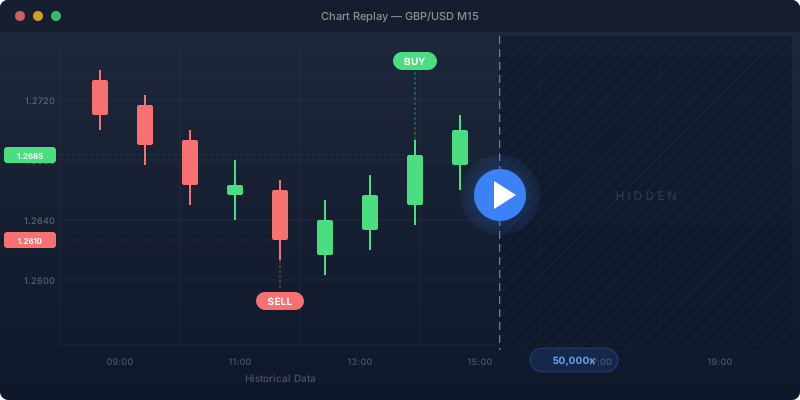
The basic workflow is straightforward: load historical data on a chart, hide the price action to the right of your starting point, then advance the chart bar by bar (or tick by tick) while applying your strategy rules. When you see a valid entry signal, place a simulated trade. When your exit conditions are met, close it. Log each trade and review your overall statistics once finished.
Why Manual Backtesting Still Matters
Automated strategy testers have improved dramatically, but manual backtesting remains essential for discretionary traders:
- Pattern recognition — Your brain learns to identify setups faster after reviewing hundreds of them by hand.
- Context awareness — Manual testing lets you factor in news events, session times, and market structure.
- Strategy development — Stepping through charts reveals edge cases where your strategy breaks down.
- Emotional preparation — Seeing losing streaks in replay builds discipline for live trading.
Platform Comparison
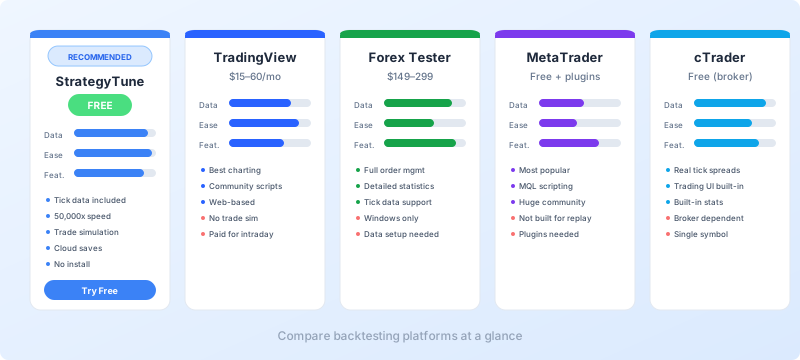
The table below summarizes the key differences between major backtesting platforms. Each platform takes a different approach to data, replay controls, and trade tracking.
| Platform | Pricing | Data Quality | Ease of Use |
|---|---|---|---|
| StrategyTune Recommended | Free | Tick-by-tick (highest) | Very Easy |
| TradingView | Free (daily bars) / $15–60/mo (intraday) | Bars (plan-dependent granularity) | Easy |
| Forex Tester | $149–$299 (one-time) + data subscription | Tick-by-tick | Moderate |
| MetaTrader 4 | Free (platform) / $99+ (plugins) | Variable (broker-dependent) | Difficult |
| MetaTrader 5 | Free (platform) / $99+ (plugins) | Variable (improved over MT4) | Difficult |
| cTrader | Free (via broker) | Tick-by-tick (from broker) | Easy |
| NinjaTrader | Free (sim) / $99/mo or $1,099 lifetime | Tick + Level II (highest for futures) | Moderate |
StrategyTune
StrategyTune is a browser-based manual backtesting platform with tick-level data for 70+ instruments. No installation needed — pick an instrument, choose a date, and replay up to 50,000x speed. Free, with cloud saves and built-in trade journaling.
Key strengths
- Tick data included — Years of tick-by-tick price history for 70+ instruments, ready to use.
- Replay speed — From 1x to 50,000x. Jump forward or backward in time without restarting.
- Trade simulation — Place market and pending orders directly on the chart. The platform tracks your open positions, P&L, and trade statistics automatically.
- Cloud saves — Sessions are saved to the cloud. Resume from any device, any browser.
- Completely free — No subscription, no trial limits. Full access to all instruments and features.
Limitations
- No custom indicator imports (uses built-in indicators only)
- Instrument coverage limited to forex, indices, commodities, crypto, and select stocks
For traders who want to start backtesting immediately without fighting software setup or data management, StrategyTune is the most direct option available.
TradingView
TradingView is primarily a charting platform, but its Bar Replay feature makes it useful for manual backtesting. You select a past date on any chart and the platform hides future price data, letting you step forward bar by bar.
Key strengths
- Charting quality — Excellent charts with thousands of community indicators and drawing tools.
- Accessibility — Web-based, works on any device. No installation.
- Wide coverage — Supports stocks, forex, crypto, and more markets than most backtesting tools.
Limitations
- Free tier restricted — Free plan only replays daily bars. Intraday replay requires a paid subscription ($15–60/month).
- No trade simulation — There is no built-in way to simulate orders or track P&L during replay. You must log trades manually.
- No spread modeling — Replay uses chart price with no bid/ask simulation.
TradingView works best for visual strategy practice and quick idea validation, but serious backtesting requires external trade logging.
Forex Tester
Forex Tester is a standalone Windows application built specifically for manual and semi-automated backtesting. It has been available since the mid-2000s and is one of the most established tools in this category.
Key strengths
- Dedicated simulation — Full order management with market, limit, and stop orders. Supports multiple open positions.
- Built-in statistics — Generates detailed performance reports including profit factor, maximum drawdown, and win rate.
- Tick data support — Can import high-quality tick data for accurate simulation.
Limitations
- Cost — One-time purchase of $149–$299, plus separate data subscription fees.
- Windows only — No native Mac or Linux support.
- Data setup — Requires downloading and importing data before you can start testing.
MetaTrader 4 & 5
MetaTrader is the most widely used forex trading platform globally. Manual backtesting is possible through the Strategy Tester's Visual Mode, but it was designed for automated Expert Advisors, not manual replay.
Key strengths
- Ubiquitous — Available through virtually every forex broker. Huge community and indicator library.
- Free — No cost for the platform itself (available through broker demo accounts).
- Customizable — MQL4/MQL5 scripting enables custom indicators and tools.
Limitations
- Not built for manual replay — Visual Mode requires loading a dummy Expert Advisor. There is no on-chart trade interface for manual backtests.
- No built-in analytics — No performance tracking for manual trades.
- Data quality variable — Depends on broker. Tick data import is complex and storage-intensive.
- Plugins recommended — Soft4FX (~$99) or similar plugins dramatically improve the manual backtesting experience on MT4/MT5.
cTrader
cTrader, by Spotware, includes a built-in Market Replay feature that stands out among broker platforms. It streams historical tick data and lets you trade on the replaying chart using the standard trading interface.
Key strengths
- Real tick data with actual spreads — Replays historical bid/ask prices for realistic simulation.
- Integrated trading UI — Place orders using the same interface as live trading. Includes pending orders and one-click trading.
- Free — Market Replay is a built-in feature, no extra cost.
- Built-in stats — Equity curve, trade statistics, and event timeline included.
Limitations
- Broker-dependent — Only available through cTrader-supporting brokers.
- Windows-focused — Desktop version has the best replay features.
- Single symbol per session — Cannot trade multiple instruments simultaneously in one replay.
NinjaTrader
NinjaTrader 8 is a professional-grade platform focused on futures trading. Its Playback feature replays recorded market data, including Level II order book depth, for highly accurate simulation.
Key strengths
- Market Replay with Level II — Highest fidelity replay available, including full order book depth.
- Futures focus — Excellent coverage for CME, CBOT, and other futures markets.
- Advanced analytics — Strategy Analyzer provides comprehensive backtesting reports.
Limitations
- Complexity — Steeper learning curve than web-based alternatives.
- Data availability — Market Replay data typically covers ~90 days. Longer history requires recording live data or third-party sources.
- Cost — Free for simulation, but live trading requires a license ($99/month or $1,099 lifetime).
Choosing the Right Platform
The right platform depends on what you trade and how you prefer to work:
- Forex and CFD traders wanting the easiest start — StrategyTune (free, instant, tick data included)
- Visual learners who want great charting — TradingView (free for daily bars, paid for intraday)
- Serious forex testers who want detailed statistics — Forex Tester (paid, Windows only)
- Futures traders needing Level II depth — NinjaTrader (free for sim)
- cTrader users — Market Replay is excellent and free
- MetaTrader users — Consider Soft4FX plugin for a better experience
Getting Started
If you are new to manual backtesting, here is a simple path to follow:
- Pick one instrument — Start with a major pair like EUR/USD or an index like S&P 500.
- Choose a platform — For the fastest start, open StrategyTune in your browser.
- Define your rules — Write down your entry, exit, and risk management rules before starting.
- Replay and trade — Step through at least 50–100 trades to get a meaningful sample.
- Review results — Analyze your win rate, risk/reward ratio, and equity curve. Adjust your strategy and repeat.
The key is consistency. Manual backtesting works when you apply the same rules repeatedly and measure the results objectively.
Ready to start?
Browse all available instruments or jump straight into backtesting on StrategyTune.